Apache Kafka and ML use cases
In this post we focus on Apache Kafka. For more on model serving with Seldon-Core and TensorFlow Serving, see our Dog Breed Classification blog post.
Topics covered:
- How Apache Kafka works
- What is Confluent Platform and how to set it up
- How to publish a message on a topic with a Kafka producer
- How to fetch a message from a topic with a Kafka consumer and send a message to a Slack channel
Why would you use Apache Kafka?
Apache Kafka is a data store optimized for processing streaming data in real-time. Streaming data is the continuous transfer of data from different data sources at a steady, high-speed rate. A streaming platform needs to handle this huge amount of data incrementally and sequentially. Benefits of Kafka: it is scalable, highly reliable, and offers high performance.
How does Apache Kafka work?
Broadly, Kafka accepts streams of events written by data producers and stores records chronologically in partitions across brokers (servers). Each record contains information about an event; they are grouped into topics. Data consumers get their data by subscribing to the topics they want.
Project development
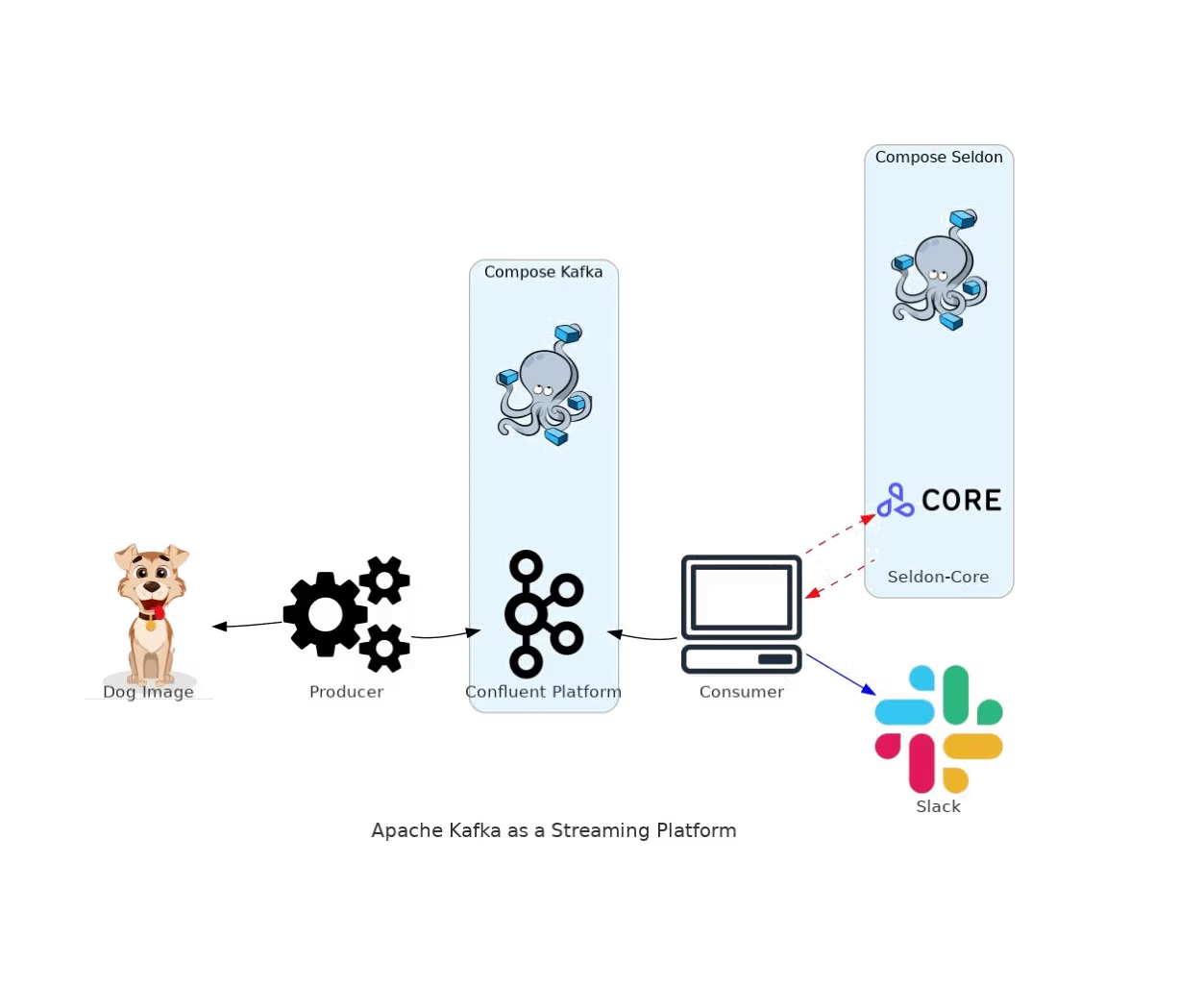
Apache Kafka is written in Java and Scala by the Apache Software Foundation. In this project we use kafka-python, a Python client for Apache Kafka. We use Confluent Platform, which includes the latest release of Kafka and additional tools and services. To set up Confluent Platform we use the official Docker Compose file.
Kafka producer: We encode the image to string using base64. We use producer.send() to create the topic in the broker if it doesn't already exist and send the image to the broker endpoint.
Kafka consumer: The consumer receives the image as a string from the topic, decodes and saves it locally. We use TensorFlow Keras to process the image for the prediction. We use either TensorFlow Serving or Seldon-Core to serve the image to the model and get back the prediction. We then send the photo and prediction to Slack. To send the message and photo to Slack you need to build a Slack app, connect it to the channel, and add the Bot User OAuth Token and channel ID to the code.
Setup
The Docker Compose file from Confluent starts the required components. The dashboard can be accessed at http://localhost:9021.
Trigger the producer:
python3 kafka_producer.pyIf the topic "dogtopic" doesn't exist it will be created automatically. A dog image will be sent as a message to the topic.
Consume data: When the consumer receives a dog image, it will be sent to Seldon-Core to get the predicted dog breed. The result will be posted on a Slack channel.
Conclusion
In this blog you learned how to set up Confluent Kafka and create a simple Kafka producer that creates a topic and sends an image, which is then received by the Kafka consumer and used to get a prediction from a TensorFlow model, with the image and prediction sent to Slack. This basic example should give you an idea of the kafka-python structure you can use for your own projects.
GitHub repo: https://github.com/data-max-hq/kafka-dogbreed-classification
For any questions, feel free to reach out to us at hello@datamax.ai.
DataMax Team
DataMax Team