MultiGPU Kubernetes Cluster for Scalable and Cost-Effective Machine Learning with Ray and Kubeflow
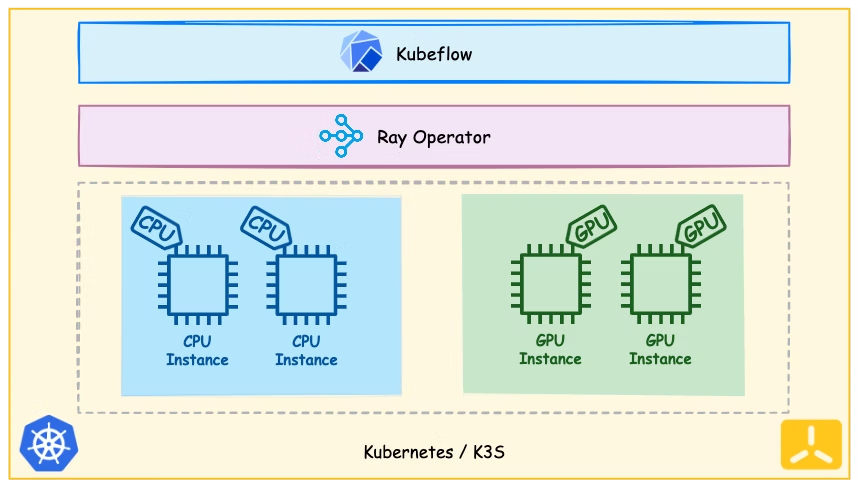
Large Language Models (LLMs) are very much in demand right now and need a lot of compute power to train. Llama 1 used 2048 NVIDIA A100 80GB GPUs and trained for 21 days, with an estimated cost north of $5 million. Instead of scaling vertically, a growing idea is scaling horizontally — using distributed computing frameworks to run training jobs on multiple GPU instances. In this post, we explore how Kubernetes, Ray, and Kubeflow can be combined to create an efficient and cost-effective ML training platform.
Goal
This post demonstrates how to build a Kubernetes cluster that orchestrates GPU workloads, increasing utilization of on-prem GPU resources or enabling workloads on specialized cloud providers like Genesis Cloud. Open-source tools like Ray and Kubeflow efficiently distribute and orchestrate training jobs to maximize performance and reduce costs.
What are Kubernetes and Kubeflow
Kubernetes is an open-source container orchestration system for deployment, scaling, and management of containerized applications. Kubeflow is a machine learning toolkit with tight Kubernetes integration, providing a collection of tools for building and deploying ML workflows at scale.
What are Ray and KubeRay
Ray is an open-source framework for scaling complex AI and Python workloads. Its simple API makes distributed training and serving of ML models straightforward. KubeRay Operator allows you to orchestrate Ray jobs on Kubernetes, taking advantage of Ray's benefits within your existing infrastructure.
Bringing it All Together
We use K3s, a lightweight Kubernetes distribution. The cluster contains GPU and CPU-only instances. On Genesis Cloud: $0.70/hr per NVIDIA RTX3090 GPU, $0.10/hr for 2vCPU CPU-only instances.
Versions used in this demo:
- Kubernetes 1.25
- Python 3.8
- Ray 2.6
- Kubeflow 1.7
- Ubuntu 20.04
- KubeRay 0.6.0
- NVIDIA GPU Operator v23.6.0
Tools like curl, git, make, kustomize, and helm must be installed locally.
Setting up the K3s cluster
Install K3s on the main node (4 vCPU, 8 GiB, 80 GiB SSD — no GPU needed, as it runs Kubernetes administrative tasks):
curl -sfL https://get.k3s.io | sh -Get the node token to allow worker nodes to join the cluster:
sudo cat /var/lib/rancher/k3s/server/node-tokenAdd worker nodes (each configured with 2 RTX 3090 GPUs):
curl -sfL https://get.k3s.io | \
  K3S_URL=https://<MAIN_NODE_IP>:6443 \
  K3S_TOKEN=<K3S_TOKEN> sh -
NVIDIA GPU Operator
The GPU Operator makes hardware GPUs visible to the Kubernetes cluster. Install it with Helm, then inspect allocatable GPU resources:
kubectl describe nodes | grep -A 10 "Allocatable"
# Shows CPUs, memory, nvidia.com/gpu count, and pods limit (default 110)
KubeRay Operator
Install the KubeRay Operator with Helm. The Ray cluster is running when the head pod reaches the RUNNING state:
kubectl get pods -n kubeflow-user-example-comVerify the cluster by running a GPU check from a Kubeflow Notebook or directly from a pod:
pip install ray==2.6.1import ray
ray.init(address="<RAY_ADDRESS>")
@ray.remote(num_gpus=2)
def check_gpus():
print(ray.get_gpu_ids())
check_gpus.remote()
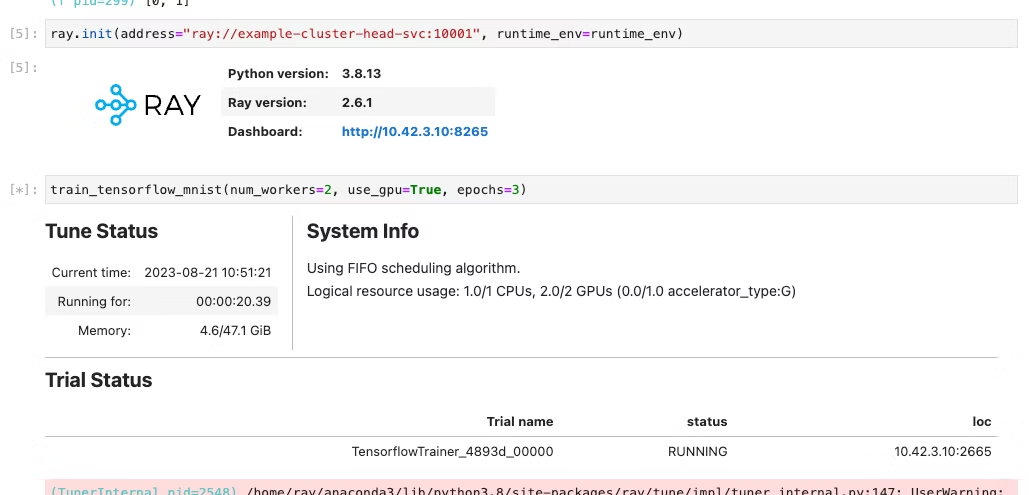
# Expected output: [0, 1]Distributed MNIST Training with Ray Train
We use Ray Train and ScalingConfig to allocate resources and abstract away framework complexity:
import argparse
from filelock import FileLock
import json
import os
import numpy as np
import tensorflow as tf
from ray.train.tensorflow import TensorflowTrainer
from ray.air.integrations.keras import ReportCheckpointCallback
from ray.air.config import ScalingConfig


def mnist_dataset(batch_size: int) -> tf.data.Dataset:
    with FileLock(os.path.expanduser("~/.mnist_lock")):
        (x_train, y_train), _ = tf.keras.datasets.mnist.load_data()
    x_train = x_train / np.float32(255)
    y_train = y_train.astype(np.int64)
    return (
        tf.data.Dataset.from_tensor_slices((x_train, y_train))
        .shuffle(60000)
        .repeat()
        .batch(batch_size)
    )


def build_cnn_model() -> tf.keras.Model:
    return tf.keras.Sequential([
        tf.keras.Input(shape=(28, 28)),
        tf.keras.layers.Reshape(target_shape=(28, 28, 1)),
        tf.keras.layers.Conv2D(32, 3, activation="relu"),
        tf.keras.layers.Flatten(),
        tf.keras.layers.Dense(128, activation="relu"),
        tf.keras.layers.Dense(10),
    ])


def train_func(config: dict):
    per_worker_batch_size = config.get("batch_size", 64)
    epochs = config.get("epochs", 3)
    steps_per_epoch = config.get("steps_per_epoch", 70)

    tf_config = json.loads(os.environ["TF_CONFIG"])
    num_workers = len(tf_config["cluster"]["worker"])
    strategy = tf.distribute.MultiWorkerMirroredStrategy()

    global_batch_size = per_worker_batch_size * num_workers
    multi_worker_dataset = mnist_dataset(global_batch_size)

    with strategy.scope():
        multi_worker_model = build_cnn_model()
        multi_worker_model.compile(
            loss=tf.keras.losses.SparseCategoricalCrossentropy(from_logits=True),
            optimizer=tf.keras.optimizers.SGD(learning_rate=config.get("lr", 0.001)),
            metrics=["accuracy"],
        )

    history = multi_worker_model.fit(
        multi_worker_dataset,
        epochs=epochs,
        steps_per_epoch=steps_per_epoch,
        callbacks=[ReportCheckpointCallback()],
    )
    return history.history


def train_tensorflow_mnist(num_workers: int = 2, use_gpu: bool = False, epochs: int = 4):
    config = {"lr": 1e-3, "batch_size": 64, "epochs": epochs}
    trainer = TensorflowTrainer(
        train_loop_per_worker=train_func,
        train_loop_config=config,
        scaling_config=ScalingConfig(num_workers=num_workers, use_gpu=use_gpu),
    )
    return trainer.fit()
Notice we use TensorflowTrainer to instruct Ray that this is a TensorFlow training task, and ScalingConfig tells Ray the amount of resources required. More examples for HuggingFace Transformers or PyTorch models are available in the Ray Train documentation.
Benefits and Challenges
Benefits
- Flexibility — not bound to any specific cloud provider; can leverage specialized GPU providers.
- Scalability — Kubernetes, Ray, and Kubeflow provide a powerful, scalable ML platform.
- Cost-effectiveness — mix of CPU and GPU instances optimizes for both cost and performance.
- Ease of management — Kubernetes simplifies deployment and scaling of the distributed platform.
- Efficient resource management — Ray's distributed resource management optimizes large training tasks.
Challenges
- Complexity — managing your own Kubernetes cluster can be demanding, especially for high availability.
- Version sensitivity — Ray is very sensitive to Python and library versions across the notebook kernel, local environment, and Ray Cluster — all must match down to the minor version.
- Data transfer costs — depending on your cloud provider, egress charges can make cross-provider data movement expensive.
Summary
This post demonstrated how to build a powerful platform for training large ML models at scale using Kubernetes, Kubeflow, and Ray — a flexible, scalable, and cost-effective solution. In Part 2 of the series, we will look at training an LLM model and adding Autoscaling so you don't pay for GPUs when the cluster is idle.
For any questions, feel free to reach out to us at hello@datamax.ai.

Sadik Bakiu
CEO at DataMax