Deploy Airflow and Metabase in Kubernetes using Infrastructure-as-Code
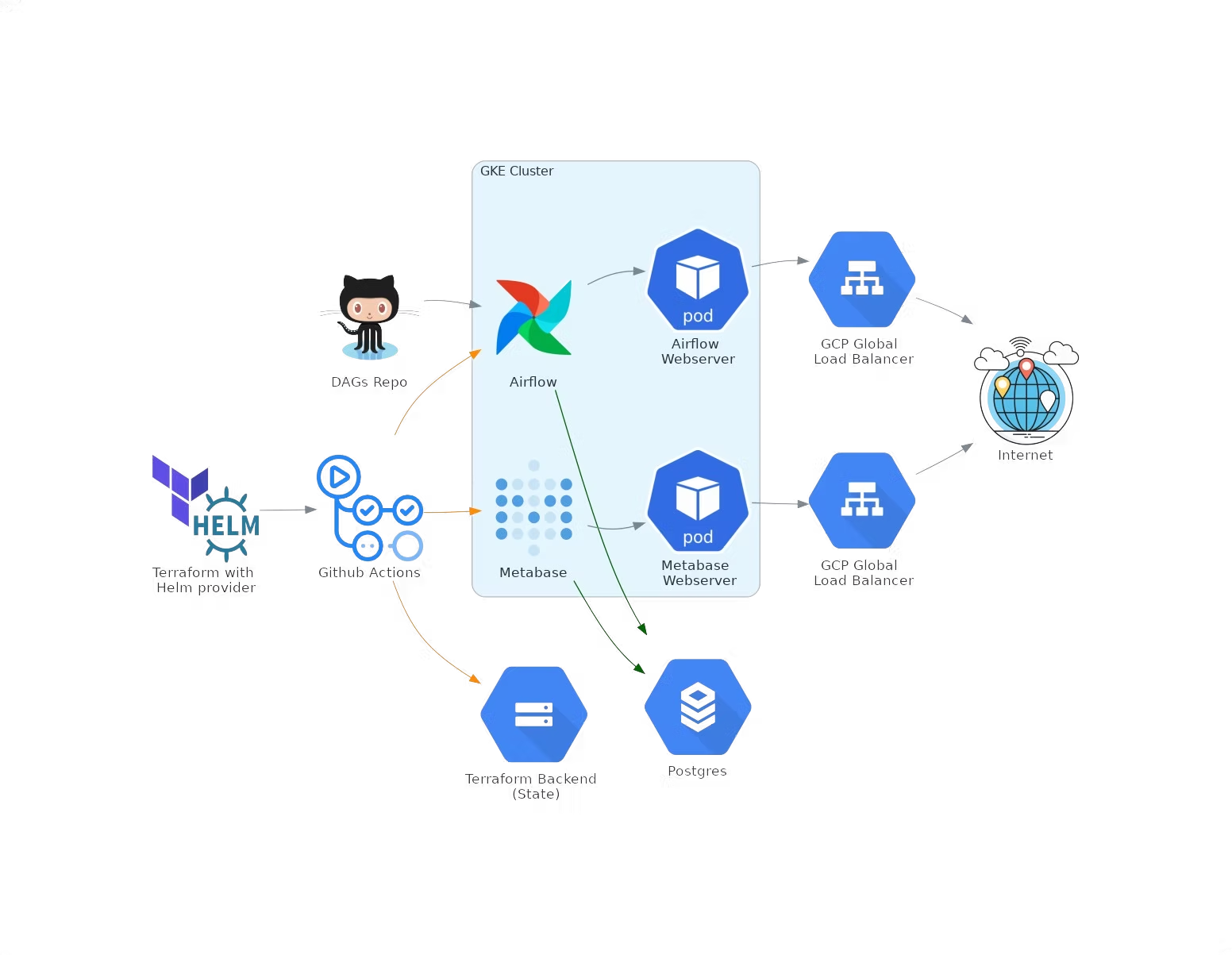
A step-by-step guide to deploying Airflow and Metabase in GCP with Terraform and Helm providers.
With the extensive usage of cloud platforms nowadays, many companies rely on Terraform to automate everyday infrastructure tasks — managing cloud resources as code that can be reused across multiple environments following the DRY (Don't Repeat Yourself) standard.
This post provides a practical example for managing the entire infrastructure lifecycle with Terraform and GCP (Google Cloud Platform) to deploy Airflow and Metabase in Kubernetes, using the Terraform Helm Provider so that infrastructure and application deployment are as streamlined as possible.
Prerequisites
- At least one GCP project (cannot be created with Terraform unless the account is part of an organization).
- A GCS bucket for the Terraform backend — required to store the Terraform state remotely.
- A service account for Terraform to authenticate to GCP.
Infrastructure Setup
1. GCP Services
Enable Cloud Resource Manager API first, then enable the remaining required services.
2. VPC Network
Set up a VPC with a single subnet and two secondary CIDR IP ranges for GKE pods and GKE services.
3. GKE Cluster
Values in the GKE module are referenced from the network module, creating a dependency between these modules — the same technique used to ensure Resource Manager API is enabled first.
4. Cloud SQL Postgres Instance
Set up VPC peering for a private Postgres instance, with two additional databases (airflow-db and metabase-db) and a dedicated user. Credentials are stored in GCP Secret Manager.
Tips: Store your Terraform state in a backend (GCS in this case), and strictly control who has access — ideally only the Terraform service account.
5. Installing Helm Charts with Terraform Helm Provider
Use the Terraform Helm Provider to connect to the newly created GKE cluster and install Airflow and Metabase Helm charts.
Set up git-sync for Airflow DAGs
We need git-sync to import DAGs from a GitHub repository. To enable it:
# 1. Generate an RSA SSH key
ssh-keygen -t rsa -b 4096 -C "airflow-git-sync"

# 2. Set the public key on the Airflow DAGs repository

# 3. Export the base64-encoded private key as a Terraform variable
export TF_VAR_airflow_gitSshKey=$(base64 -w 0 ~/.ssh/id_rsa)
Set repo, branch, and subPath in the tfvars file. Terraform's native support for reading environment variables lets us store the private SSH key securely.
To provision the full infrastructure and deploy Airflow and Metabase, run:
terraform init
terraform plan
terraform apply
Airflow and Metabase can be accessed at the endpoint information provided in: Kubernetes Engine > Services & Ingress
Deploying Multiple Environments with Terraform
Terraform workspaces let you separate state and infrastructure without changing any code. Each workspace is a separate environment with its own variables.
CI/CD with GitHub Actions
We use GitHub Actions for CI/CD. To provision infrastructure across multiple environments, configure different Terraform workspaces triggered on different branches, passing the appropriate values and credentials.
Conclusions
This solution is just one of many approaches to managing cloud infrastructure. The most notable advantages are reduced errors and the ability to reproduce the same infrastructure effortlessly with little to no human interference. For any questions, feel free to reach out to us at hello@datamax.ai.

Igli Koxha
DataMax Team